





Listen to the article
HubSpot's latest round of updates has something for everyone in the property management or real estate space. There's a brand-new AI work management tool, smarter record fields, a fix for pipeline boards, a built-in proofreader for marketing emails, and a much clearer view of who's involved in your bigger deals. None of them require a portal rebuild, and a few will even save your team hours every week.
See something that looks interesting? Speak to a Geek and we'll help you get started.
Retire the Side Spreadsheets with HubSpot Work
Every property management company has at least one spreadsheet running the business behind the scenes. It might be the owner onboarding checklist, the make-ready tracker, or the list of leases coming up for renewal. The problem is that none of those spreadsheets can see into the CRM, so whoever is running the process has to bounce between tools to find the owner's history, deal notes, or the last conversation with a tenant.
HubSpot Work, now in public beta, is HubSpot's answer to that problem. It's an AI-powered work management tool built directly into HubSpot and connected to your contacts, companies, and deals. You describe what you need, the way you'd explain it to a colleague, and the AI builds the project for you: data tables, columns, forms, documents, and automated agents. You can also start from templates like client onboarding or deal desk coordination, or jump in with a sample project.
The agents are where it gets interesting. Each agent is a bundle of workflows, and each workflow is a trigger plus steps. Some steps are simple automations (if this happens, notify someone), while others are AI-driven steps that can take action on your behalf. Because those agents can see the CRM, they're working with real deal history and customer context, not just a task list.
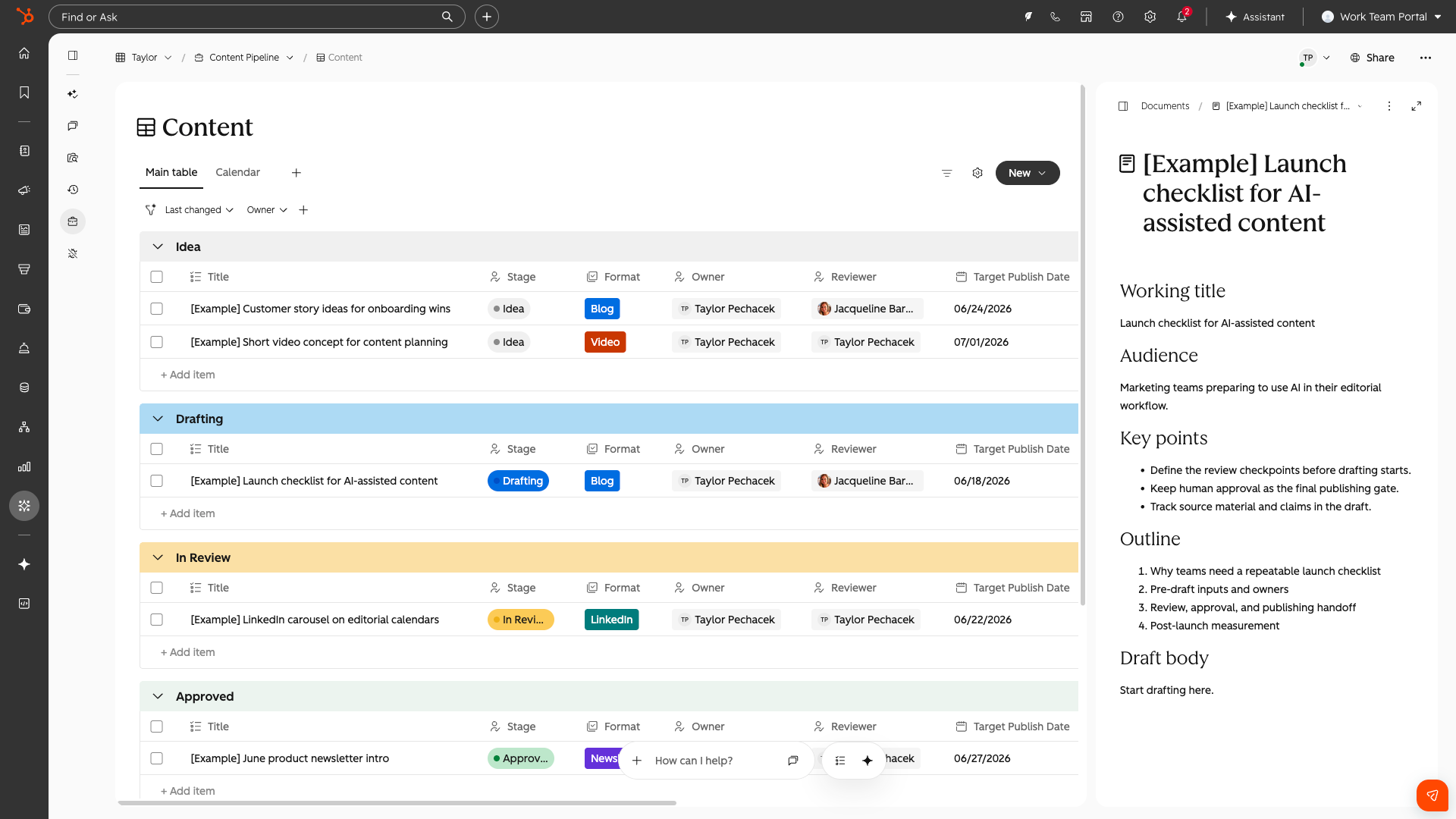
Here's how that could look for a property management or real estate team:
- Owner onboarding - Describe your new-owner process and HubSpot Work builds a project tied to the owner's record, covering management agreement, W-9, property inspection, keys, utility transfers, and listing photos. An agent can even flag missing documents and nudge the right team member when a step is delayed.
- Turnovers and make-readies - When a tenant gives notice, kick off a project that tracks the move-out inspection, vendor scheduling, cleaning, repairs, and re-listing, so leasing and maintenance share one view of when the unit will be rent-ready.
- Lease renewals - Build a renewal tracker that surfaces leases expiring in the next 90 days, with an agent that starts outreach and alerts the property manager when a tenant hasn't responded.
HubSpot Work is included with any paid HubSpot seat. Starter accounts have limited automation, while Professional and Enterprise accounts have full automation. Basic automation steps don't cost anything extra, but AI-powered agent steps do consume HubSpot Credits, so it's worth considering which steps truly need AI. Once you're enrolled, look for Work Management in your left-hand navigation (it may be tucked under "More").
Smarter Records with Multi-Condition Property Logic
If you've ever opened a contact record and scrolled past twenty fields that don't apply to that person, you know how fast a CRM gets cluttered. Conditional property logic already lets you show a field only when another field had a certain value, but it could only look at one property at a time. That made it hard to build records that reflect how a property management business actually works, where the right next question usually depends on two or three things at once.
Conditional Property Logic with Combination Operators, expected to release October 15, 2026, removes that limit. You can now combine multiple conditions, so a dependent field only appears when every condition is met. This means cleaner records and more focused data collection, without asking your team to remember which fields matter when.
For property management and real estate teams, that opens up a lot of practical options:
- Tenant records - Surface a "Pet deposit paid" field only when the contact is a current resident and has a pet on file, keeping that question off every other record.
- Lost deals - Require a "Reason lost" field when a management deal is Closed Lost and the portfolio is above a certain size, so you learn why the big opportunities slipped away.
- Brokerage deals - Show financing contingency fields only when a deal is under contract and the buyer is using financing, rather than for cash buyers.
To set it up, go to Settings > Properties, choose your object (Contacts, for example), and open the Conditional logic tab. Click Create logic, set your first condition, then add more. You can duplicate the first condition to build the rest faster. Click Save logic when you're done.
Put Your Most Urgent Deals and Tickets at the Top
Board view has always let you drag a card from one stage to the next, but within a stage you were stuck with whatever order HubSpot sorted by. That's a real gap when you're working a pipeline, because the order of cards inside a stage usually says what your team should tackle next.
With Manual Sort for Board View Within Lanes, you can now drag and reorder cards inside a lane. The order you set is shared with everyone on that view and sticks over time. If a teammate reorders cards while you're looking at the board, you'll see the change in real time.
This is a small update with a lot of everyday value for property management and real estate teams:
- Maintenance tickets - Move the 'no-heat' call and the 'active leak' to the top of the "New" lane, ahead of the 'squeaky cabinet door', so whoever opens the board knows what needs a vendor first.
- Owner pipeline - Your business development team can rank prospects in the "Proposal Sent" stage by portfolio size or likelihood to sign, giving the pipeline meeting a clear starting point.
- Leasing - Order applications in the screening stage by move-in date, so the most time-sensitive ones get processed first.
To try it, open any object's index page (CRM > Deals, for example) and switch to Board view. Click Sort by, choose Manual, then drag cards wherever you need them. It's available for all hubs and tiers.
A Second Set of Eyes on Every Marketing Email
Most email mistakes aren't big ones. It's a typo in the subject line or a "Hi {first name}" that went out to half your list. Catching those usually means test sends, browser extensions, and pinging a coworker on Slack to look it over before you hit send.
Email Quality Checks, now in public beta for everyone in Marketing Hub accounts, builds that review into HubSpot's email editor. Click Quality check and an AI review scans your email for spelling and grammar issues, spam triggers, broken links, missing token fallbacks, date formatting, a weak opening line, and copy that differs from your brand voice. It also checks your personalization tokens against the audience you're sending to, so you can see how many recipients actually have that data filled in. The results show you errors, warnings, and suggestions, you can click any issue to jump straight to it, and many come with a one-tap fix.
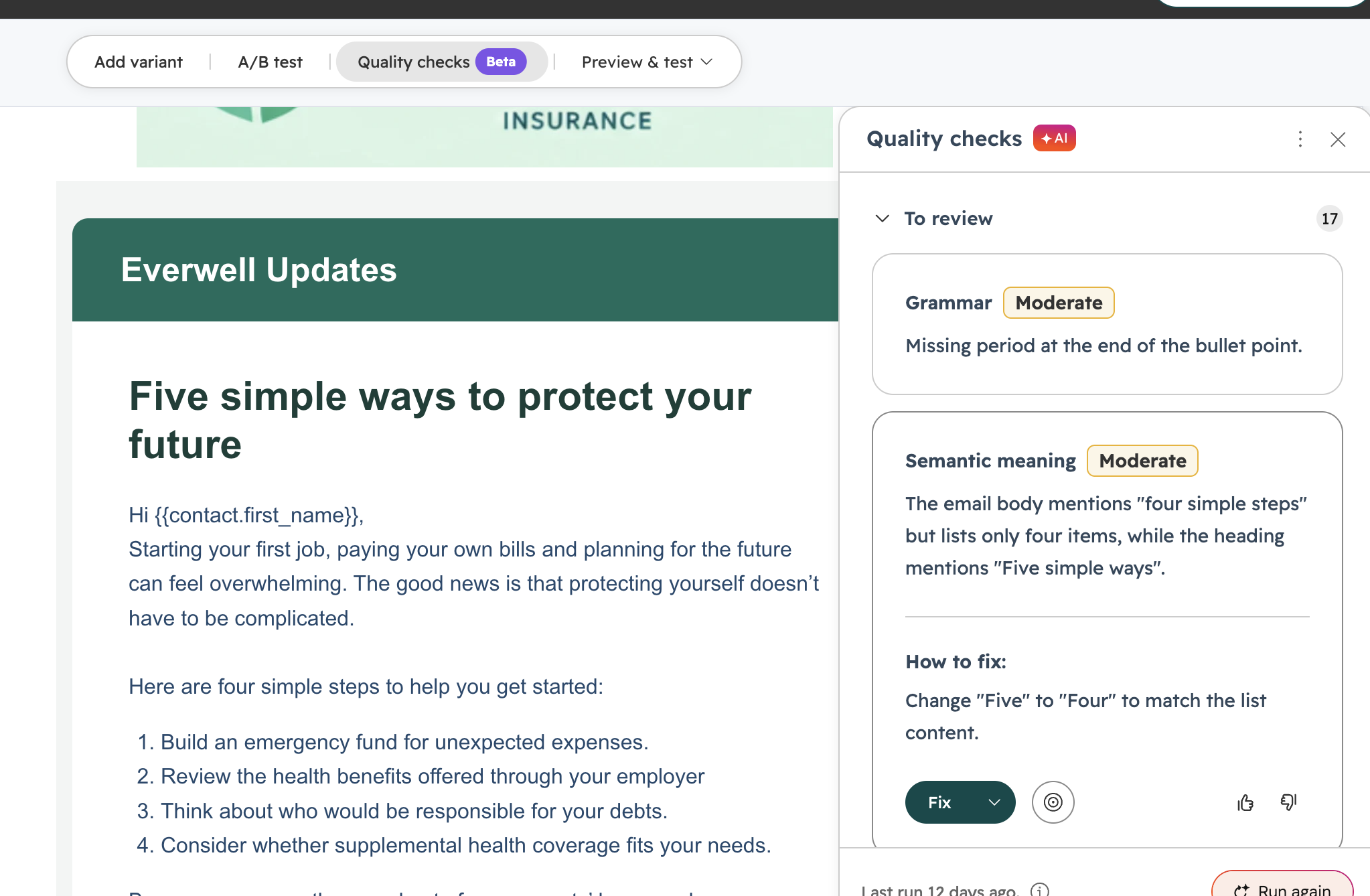
For property management and real estate marketers, this is a practical safety net:
- Tenant communications - Notices about rent increases, inspections, or community events depend on dates being right. Date formatting checks help catch a mismatched day and date before residents do.
- Listing announcements - Broken links to listings or showing schedulers cost you leads. The link check flags them before the email sends.
- Deliverability - Words like "free," "guaranteed," or "act now" creep into promotional move-in specials. The spam check helps keep those emails out of junk folders.
You can turn individual checks on or off in Settings > Marketing > Email > Quality Checks. For now, it's available for batch marketing email sends on Marketing Hub Starter, Professional, and Enterprise.
See Everyone Behind the Decision with Buying Groups and Account Maps
Winning a single-family owner usually means convincing one person. Winning a 300-unit portfolio or a commercial client is a different story. There's an asset manager, a CFO, a board, maybe an attorney, and someone in the background who has the final say. If your CRM only shows the one contact you've been emailing, you're missing most of the picture.
HubSpot's upgraded Buying Groups feature gives sales and customer success teams a visual map of the key stakeholders on an account, including who's making the call, who's influencing it, and where your relationships stand. Alongside it, Account Maps shows the structure of a company so you can see deal activity and expansion opportunities across an entire organization.
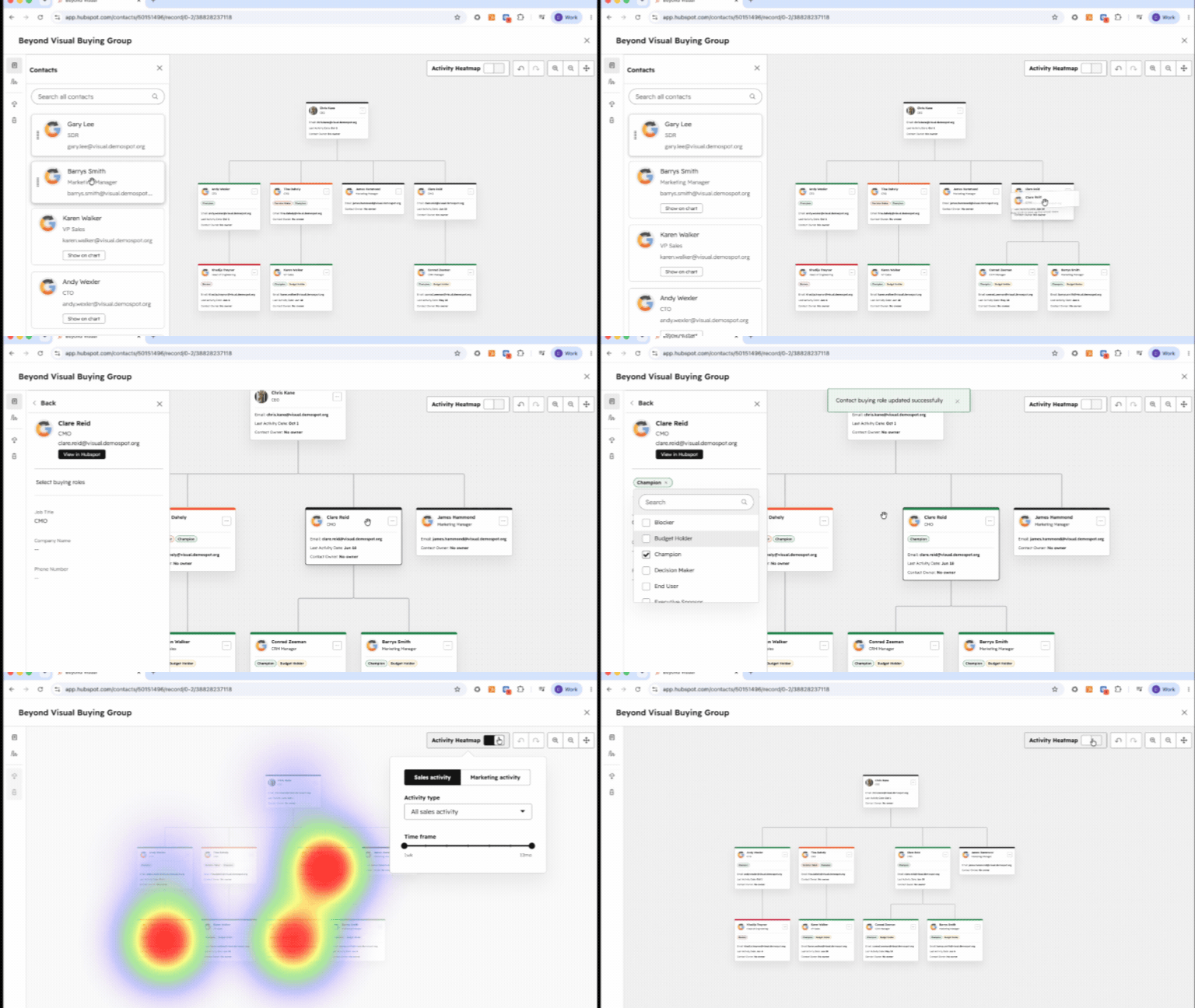
Here's where that pays off for property management and real estate teams:
- Large owner and investor pitches - When you're pitching an institutional investor or a family office, map the asset manager, finance lead, and decision-maker in one place so nobody gets left out of the conversation before the contract is signed.
- Commercial property management - Facilities managers, procurement, and corporate leadership often all have a say. Seeing that group laid out helps your team spot the gaps early.
- Renewals - When a key contact leaves an owner's organization, the buying group makes it obvious that your relationship coverage just dropped, so you can rebuild it before renewal time.
Buying Groups live on the company record, and Account Maps can be found on the related companies card and in the middle pane. Both are available on Sales Hub and Service Hub Professional and Enterprise.
The Takeaway
If you're a property management or real estate company running on HubSpot, here's where I'd start. Pick one process that currently lives in a spreadsheet, like owner onboarding or turnovers, and try rebuilding it in HubSpot Work. Switch your maintenance or owner pipeline board to manual sort so your team always knows what's next. Turn on Email Quality Checks before your next owner newsletter goes out. And once multi-condition logic lands on October 15, take a look at which fields your team is skipping and why.
If you're not sure whether your portal is ready to take advantage of these features, our team can set up a portal audit to help you get started. Speak to a Geek.
