

Listen to the article
If you manage a HubSpot portal for a property management or real estate business, you already know the platform never sits still. HubSpot ships updates constantly, and most of them slide by without anyone on the operations side noticing.This weekly update is designed to help you learn from our experience in over 50 current real estate, property management, and PropTech implementations to start adapting to the latest and greatest in the HubSpot platform.
See something that looks interesting? Speak to a Geek and we'll help you get started.
Dashboards That Finally Make Sense to Your Whole Team
Property management dashboards tend to get cluttered fast. You've got occupancy metrics, lead sources, maintenance ticket volume, and rent collection status all competing for space, and half your team has no idea what a given report card is actually measuring. HubSpot's dashboard updates are aimed squarely at that problem.
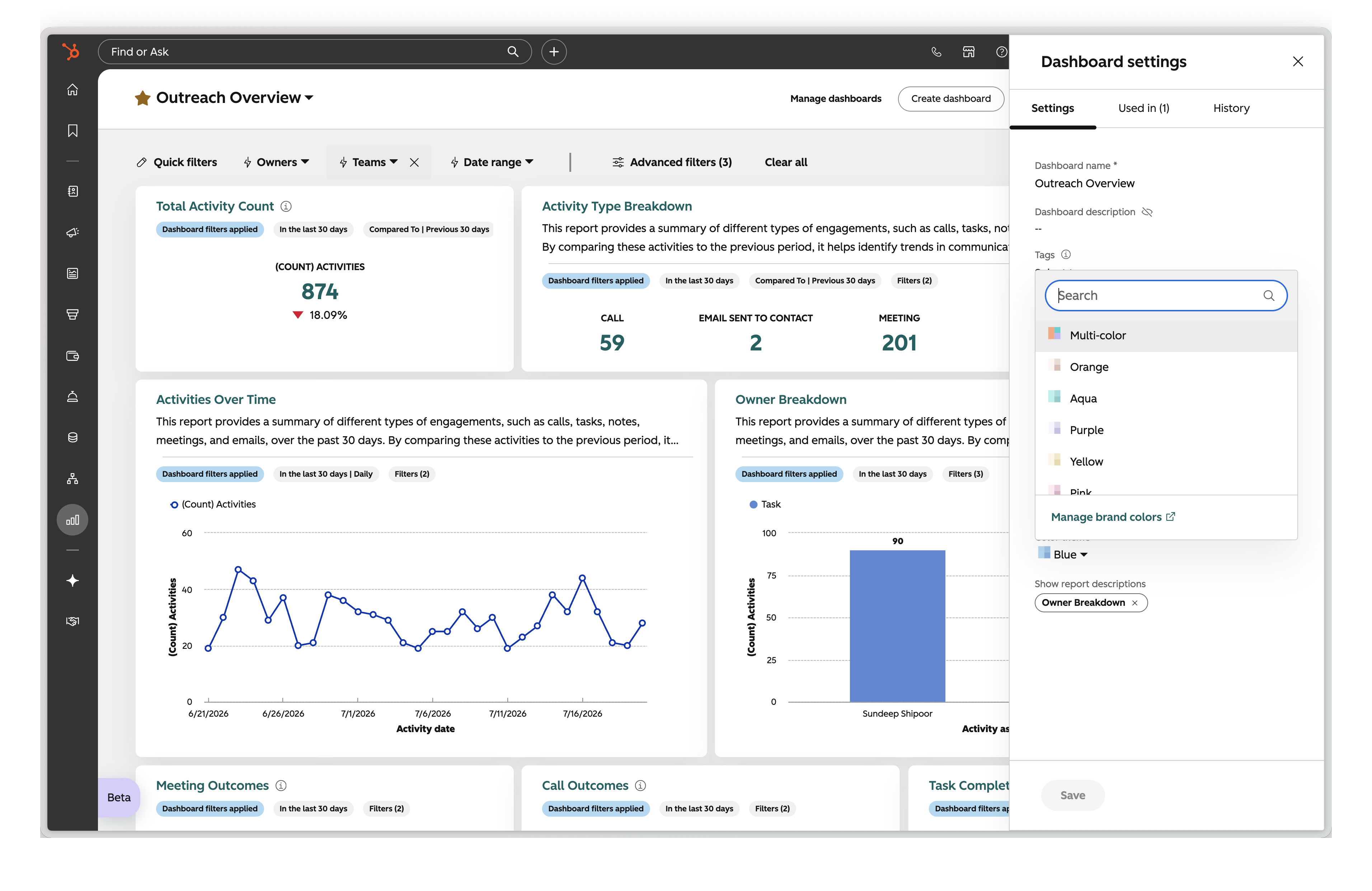
In-line report descriptions now show context directly on the report card instead of hiding it behind a hover icon. For a property management team where the ops manager, the leasing agents, and the owner are all looking at the same dashboard with varying levels of HubSpot fluency, this is a small change with a huge potential impact. Nobody has to guess what "New Leads by Source" is actually counting, or add an awkward text card just to explain a chart. To turn it on, go to Reporting > Dashboards, select your dashboard, open Settings, and check the box next to each report under "Show report descriptions."
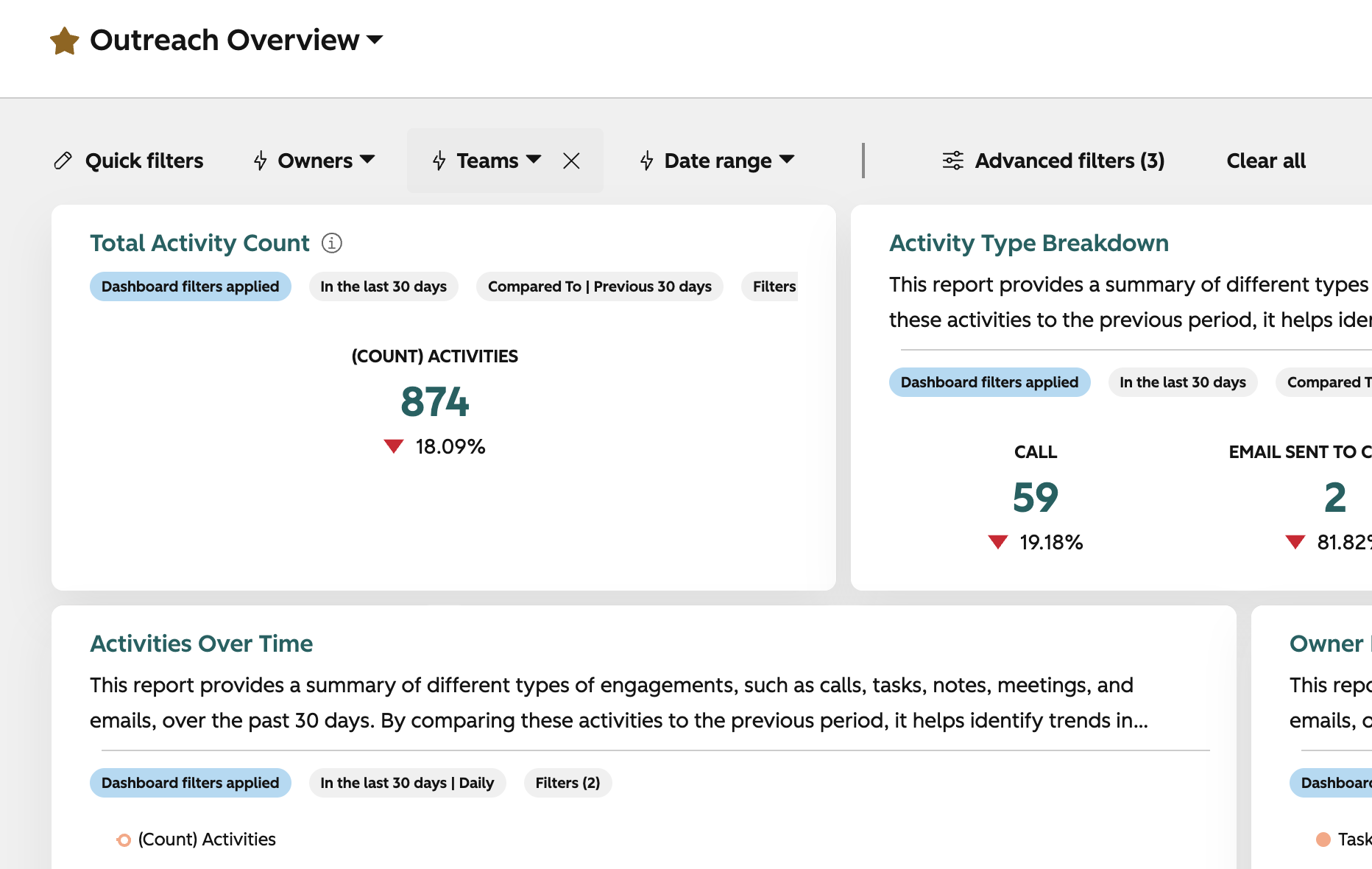
The new 12-column grid layout (now in public beta) doubles your layout flexibility from the old 6-column grid. If you're the type of PM company tracking doors under management alongside lead volume, maintenance requests, and collections all on one executive dashboard, you'll actually be able to size and arrange those cards the way the story of your business needs, instead of fighting a rigid layout.
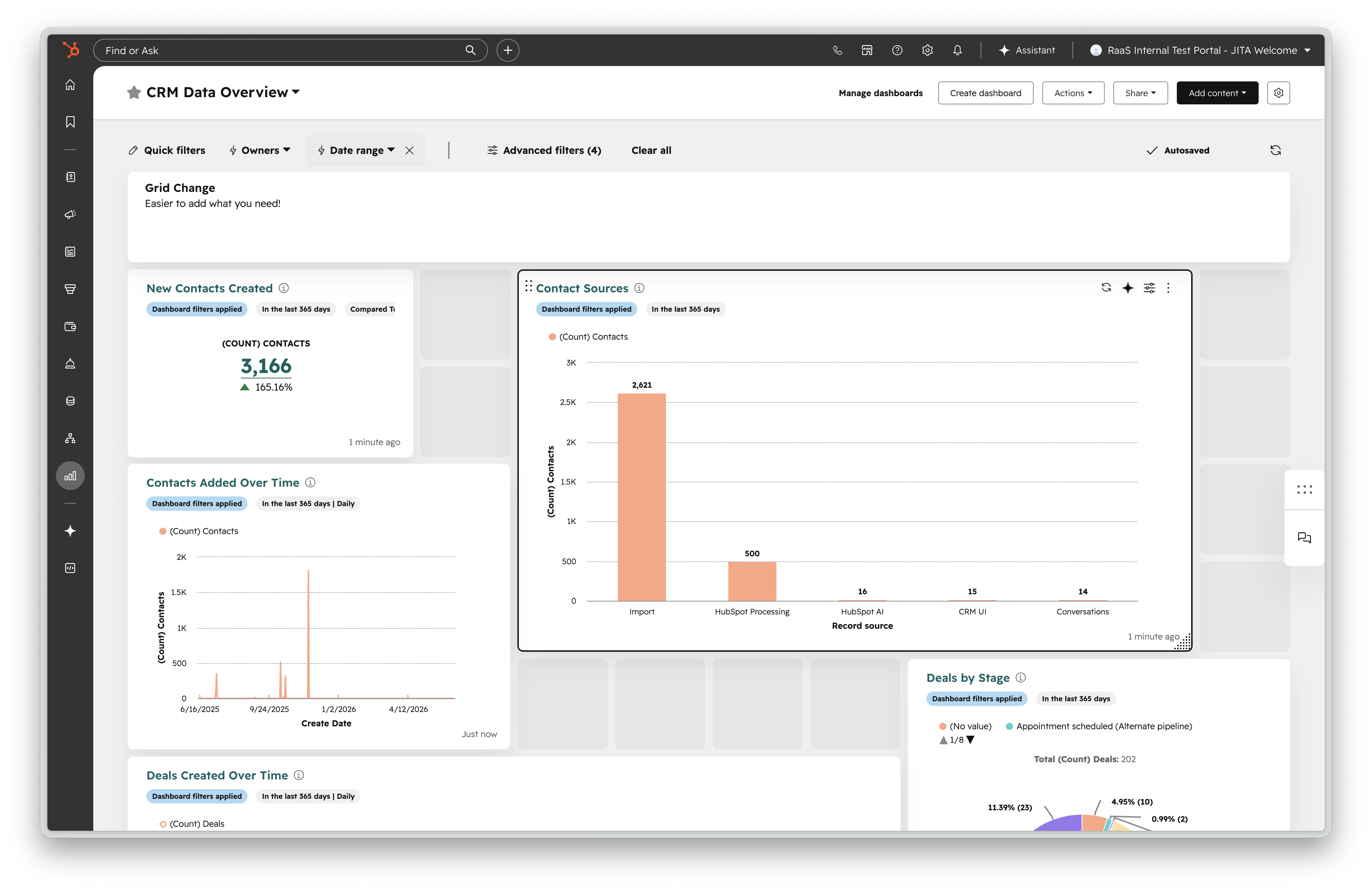
Dashboard color themes let you apply one palette to an entire dashboard in a single click, and the underlying report visualizations got a broader style refresh (if you get into the private beta), including a new default color palette (led by teal) and legend changes on donut and pie charts. None of this changes what your data says, but if you've ever handed a dashboard to an owner or investor and had them get distracted by inconsistent formatting instead of the numbers, this closes that gap. Color themes are dashboard, not report based, which means you can use brand colors on one dashboard and a partner's colors on another without having to duplicate reports. This is an excellent update if you need to use your HubSpot reports in monthly updates, presentation decks, etc.
Revenue Reporting Gets a Real Home in HubSpot
This is the update I'm most excited about for proptech, real estate, and property management specifically, because revenue in this industry is rarely simple. You've got one-time fees, recurring management fees, lease renewals, and contract terms that shift over time as units turn over or owners renegotiate. Historically, most of that lived entirely outside HubSpot, tracked in property management software or a finance team's spreadsheet, disconnected from the marketing and sales activity that drove it.
The new Contracts object and the Revenue Reporting from Contracts package (both in private beta, and increasingly being folded into HubSpot's broader Revenue Hub branding) change that. Contracts in HubSpot now capture not just what was sold, but what was booked, committed, and how it changed through renewals, expansions, and contractions. For a property management company, think about what that actually tracks: a new management agreement being signed, a client renewing at renewal time, or a client scaling down the number of doors under contract. That's the exact lifecycle PM companies already live in, and it now has a native reporting layer.
Out of the box, you get four pre-built reports: MRR Waterfall for understanding how recurring revenue is changing and why, Net New MRR to track new business separate from renewals, Booked MRR for the run-rate impact of what got signed in a given period, and Booked TCV for total contract value across a period.
If your team has ever had a hard time answering "how is our recurring revenue actually trending" without pulling numbers from two different systems, this is worth watching closely as it rolls out more broadly. HubSpot is also piloting a way to migrate existing billing relationships (whether they started in a legacy system or as Commerce Hub subscriptions) directly into Revenue Hub Contracts, which tells me this is becoming the long-term home for revenue data inside HubSpot, not a side project. A Custom Report Builder option and API access for revenue events are both coming soon, which means eventually you'll be able to blend contract data with whatever else lives in your portal, whether that's maintenance ticket volume, tenant satisfaction scores, or lead source data.
Contracts Without the Quote Requirement
The last piece ties directly into the revenue reporting above: Contracts API (public beta) and direct create and edit for contracts (private beta) mean you no longer need to generate a HubSpot quote just to create a contract record.
This matters more than it sounds like on the surface. A lot of property management and real estate businesses handle quoting or agreement generation in an external system, whether that's property management software, DocuSign, or something built in-house. Previously, getting that agreement data into HubSpot as a usable contract meant creating a workaround quote first, which is exactly the kind of clunky manual process that makes people stop trusting their CRM. Now you can create and edit contracts directly from a deal, contact, company, or ticket record, or import existing agreements straight into HubSpot as a source of truth. Authorized users can edit terms and line items without generating a change quote, and admins can control who's allowed to activate or modify a contract.
For a property management company managing agreements across dozens or hundreds of properties, being able to keep that data connected to the customer record, instead of scattered across other systems, is what actually makes revenue reporting and renewal forecasting reliable.
Your Prospects Are Asking AI Before They Ever Find Your Website
This is the update I think most property management and real estate marketers are underestimating right now. I've had this same conversation on more than one client call this month: organic traffic is trending down, the team hasn't changed anything about their SEO, and nobody can quite explain why. The honest answer, more often than not, is that a growing share of the people who used to click through to a website are now getting their answer directly from ChatGPT, Gemini, or Perplexity instead.
AEO Site Audit, a new feature inside HubSpot's Answer Engine Optimization tool, is built for exactly that problem. It analyzes your website and surfaces the content and technical issues most likely to be hurting your visibility in AI answer engines, then organizes everything into a prioritized list your team can actually act on.
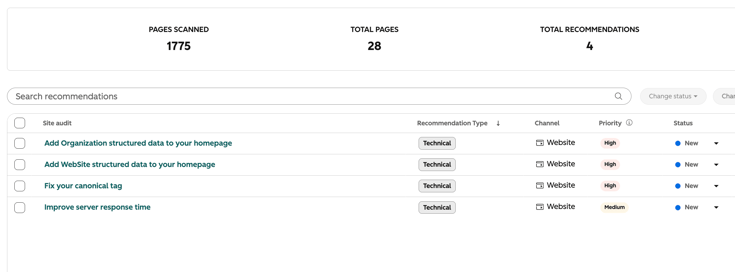
The audit runs across two dimensions. The Content Audit scans your pages against the topics and prompts you're tracking in your AEO portal, flags pages missing the depth or structure AI engines look for (things like weak meta descriptions or missing titles), and maps each recommendation to a specific page. The Technical Audit crawls your site for the structural issues that quietly suppress AI discoverability without ever tripping an obvious alert: missing structured data, poor canonicalization, slow page speed. Both come back as a scored, ranked list instead of a wall of raw findings, so you know what to fix first instead of guessing.
For property management and real estate companies specifically, this matters because the questions people are asking AI engines (which property managers work in a given city, what's included in a management fee, whether a company handles a particular property type) are exactly the kind of questions AEO Site Audit is designed to help you win. To run it, head to your AEO portal, open the Recommendations tab, and go to Site Audit. It's in public beta now for Marketing Hub Professional and Enterprise, and for HubSpot AEO subscribers, with general availability expected September 9.
Texting Finally Has a Real Home in Help Desk and Inbox
If you manage residential or commercial properties, you already know your tenants and prospects would rather text than call or email, full stop. Until now, handling that in HubSpot meant a workaround: a separate texting tool, a manual integration, or pushing people toward a channel they didn't actually want to use.
Two-Way SMS in Help Desk & Inbox (public beta) fixes that by bringing real two-way texting directly into the same workspace your team already lives in. A tenant texts your support number, a ticket or conversation shows up in Help Desk or Conversations Inbox with full context, and your rep replies from right there, no app-switching and no lost history. If a conversation started as an email, a form submission, or a phone call, your team can switch it to SMS mid-conversation without losing the thread. And because your support number now handles both calling and texting, tenants have one number to remember instead of two.
A few things worth knowing before you turn this on. It requires the Sales and Service SMS Add-on ($75 a month, including 1,000 message segments, with additional segments at $15 per 1,000), on top of Service Hub or Sales Hub Professional or Enterprise. HubSpot provisions a US-based 10DLC number during setup, and registration can take 6 to 8 business days, so this isn't a same-day turn-on. Consent is handled automatically (STOP and START work as expected), and outbound MMS isn't supported yet, though tenants can still send you images. Registration currently uses HubSpot's Customer Care campaign type, which is built for support conversations rather than automated outbound blasts, so if your team also wants automated SMS marketing, keep an eye out. Mixed-use campaign support is coming.
For a property management team fielding maintenance requests, lease questions, and rent reminders, having texting live inside the same system as your tickets and your CRM record is the kind of change that actually shows up in response times, not just in a demo.
The Takeaway
None of these updates require you to rebuild your portal. But if you're a property management or real estate company running on HubSpot, here's where I'd start: clean up one dashboard using the new report descriptions and grid layout so it's actually legible to the people looking at it, run an AEO Site Audit to see where AI answer engines might be skipping over your site entirely, and keep an eye on the Contracts object (and Revenue Hub more broadly) as it moves out of beta. If your support team is still fielding tenant texts through a personal cell phone or a bolted-on tool, Two-Way SMS is worth a serious look too.
Revenue and contract data connected natively to HubSpot, instead of living in a disconnected system, is the kind of foundation that makes every other report you build (MRR, renewal pipeline, doors under management growth) actually trustworthy. And visibility in AI answer engines is quickly becoming just as important as visibility in Google.
If you're not sure whether your current HubSpot setup is ready to take advantage of features like these, the Geekly Media team can set up a portal audit and help you get started.

-1.png)
 3 min read