





Listen to the article
HubSpot is constantly evolving, with new features, improvements, and changes being released every week. Keeping up with these updates helps property managers and real estate teams make the most of the tools they already have, while identifying new opportunities to improve marketing, sales, automation, and customer engagement. Even small product updates can create meaningful efficiencies, improve data accuracy, or open the door to new strategies. By regularly reviewing HubSpot’s latest updates, teams can stay ahead of changes, avoid disruptions, and ensure their CRM continues to support their business goals.
See something that looks interesting? Speak to a Geek and we'll help you get started.
Lead Status Data Gets a More Reliable Source of Truth
For a while, the Customer Agent Lead Status property could be updated by more than just HubSpot’s Customer Agent. Workflows, integrations, APIs, and other automated processes could write to the property, which meant the data didn’t always accurately represent Customer Agent activity. That could lead to inaccurate lead qualification data and make reporting and segmentation less reliable.
HubSpot has now made the Customer Agent Lead Status property read-only, meaning only Customer Agent can update it. This helps keep the data clean and ensures the property is only tracking activity that actually comes from the Customer Agent. If you’re using the property for reporting or segmentation, you can continue using it as usual. However, if you have a workflow or integration that currently updates this property, you’ll need to move that process to a custom contact property to avoid errors.
Your HubSpot Activity Data Just Got Easier to Manage
When activities like calls, emails, or meetings aren’t automatically connected to the right records, teams can lose important context and spend time manually piecing together customer interactions. HubSpot’s new Activity Auto-association Rules API gives developers and admins more control over how these activities are connected across records. Previously, these rules could only be managed through HubSpot settings which making it difficult for teams and integrations to update them programmatically.
With the new API access, teams can now read and update these rules automatically, making it easier to keep activity associations consistent as their CRM grows and changes. For property management and real estate teams, this can help ensure that important conversations and interactions are connected to the right contacts, companies, and records. The result is a cleaner CRM, better visibility into customer history, and less manual work for teams managing their HubSpot account.
A Place for Every Widget on Your Dashboard
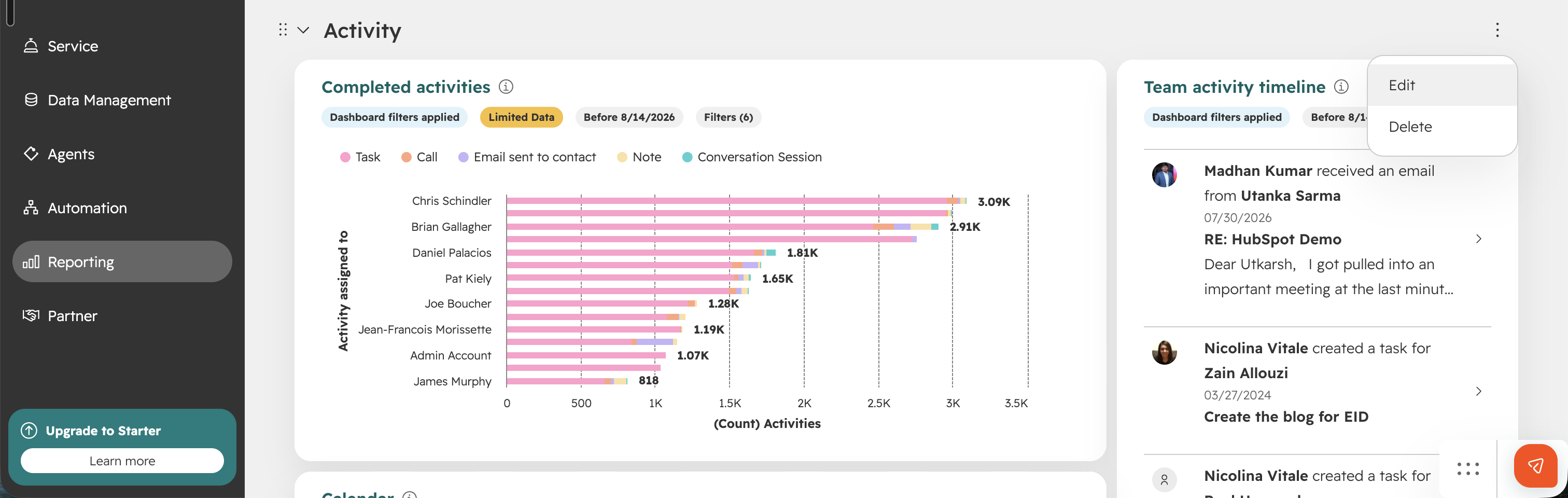
When every report and chart lives in one long list, dashboards quickly turn into a scroll-fest that doesn't reflect how your team actually works. Finding the right metric during a business review or team presentation often can lead to awkward workarounds. HubSpot's new Dashboard Sections feature gives users a built-in way to group related widgets together directly on their dashboard.
With Sections, users can create, rename, delete, and reorder groupings, then drag and drop widgets within or across sections to build the layout that fits their workflow. Each section can also be collapsed or expanded, creating visual hierarchy so teams can focus on what matters in the moment. This could be a sales team activity dashboard grouped into "Activity" and "Performance" sections, or a reporting dashboard organized around a recurring review cadence.
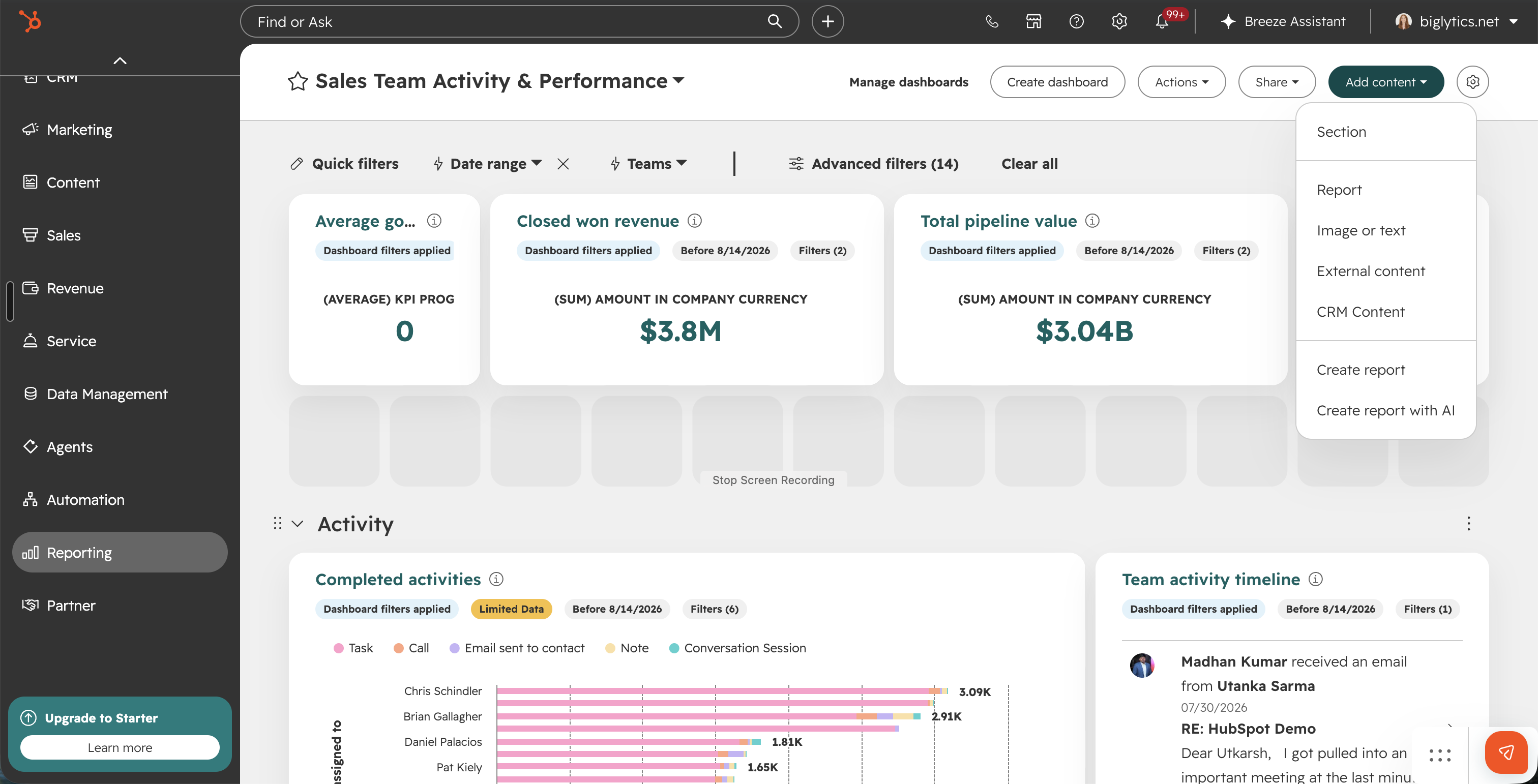
To dive in, you just need to visit the dashboard you want to edit and select "Section" from the Add Content menu. For teams juggling increasingly complex dashboards, this update makes it much easier to keep reporting structured and easy to navigate as it scales.
Every Communication, Summed Up in One Line
Catching up on a record has always meant scrolling through a wall of call notes, email threads, and logged meetings to piece the story together. "What did we last talk about?" or "Which email covered pricing?" shouldn't require opening five activities to find out. HubSpot's new AI-generated one-line summaries, now in private beta, put the key takeaway right on every call, email, note, and meeting in the CRM Activity timeline. This means no more digging through paragraphs to find the one sentence that matters.
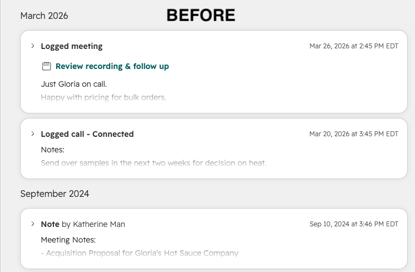
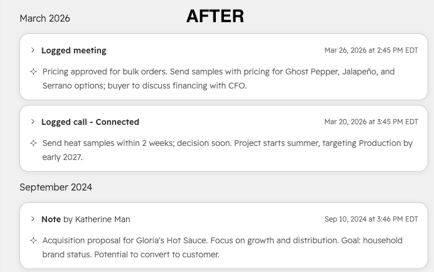
Instead of a four-paragraph call summary, users now see something like: "Discussed pricing; send quote by end of day."
For property management and real estate teams, this can be especially useful. An example could be a leasing agent picking up a lead cold can scan a resident's entire history in seconds and immediately see that a prior call covered a pet deposit question, or that the last email was about a maintenance request still awaiting follow-up, without reopening every logged interaction.
The full detail is always one click away, so nothing about the record itself changes. The true benefit is how quickly a team can get oriented. Summaries appear automatically once enrolled, with no setup required, though a few beta caveats apply: the initial load can take up to a minute (subsequent loads are instant), only entries longer than one line get summarized, and enrollment is currently available to individual users across all hubs and tiers, with portal-level enrollment coming at public beta.
Every Communication Channel, One Settings Page
If you've ever had to hop between separate inboxes and help desk settings just to check on your SMS and email setup, you know the drill...there was never one place to see it all at once. HubSpot just rolled out redesigned Channel Settings that brings every communication channel — team email, WhatsApp, SMS, live chat, calling, and custom channels — into a single settings page, so you can see what's connected and how it's configured without digging around.
If you're running a property management or real estate business, your channels are probably spread out through multiple channels - A leasing inbox for one building, WhatsApp for another, SMS for maintenance requests, maybe a separate support line for tenant issues, and until now there was no easy way to see it all at once or make sure the right people were responding on the right channel.
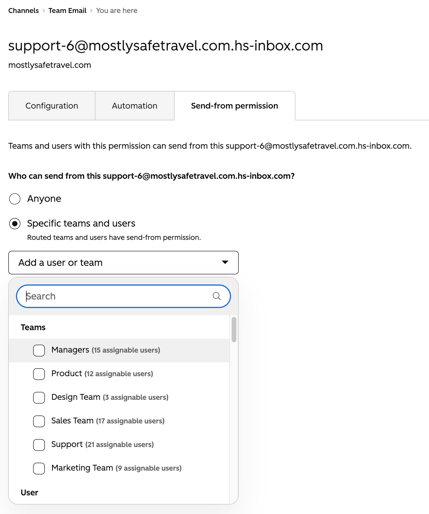
With everything consolidated into one Channels page, an ops manager can quickly spot a property that's missing a channel or a number that's gone quiet, while send-from permissions make sure a leasing agent isn't accidentally responding to a maintenance request (or vice versa) and give you a clear picture of who's actually allowed to respond in each channel. And when leasing season hits or you need to stand up a new line for a newly acquired building, the guided setup wizard means your team can get it configured (routing, assignment, availability, and all) without needing a HubSpot expert on hand.
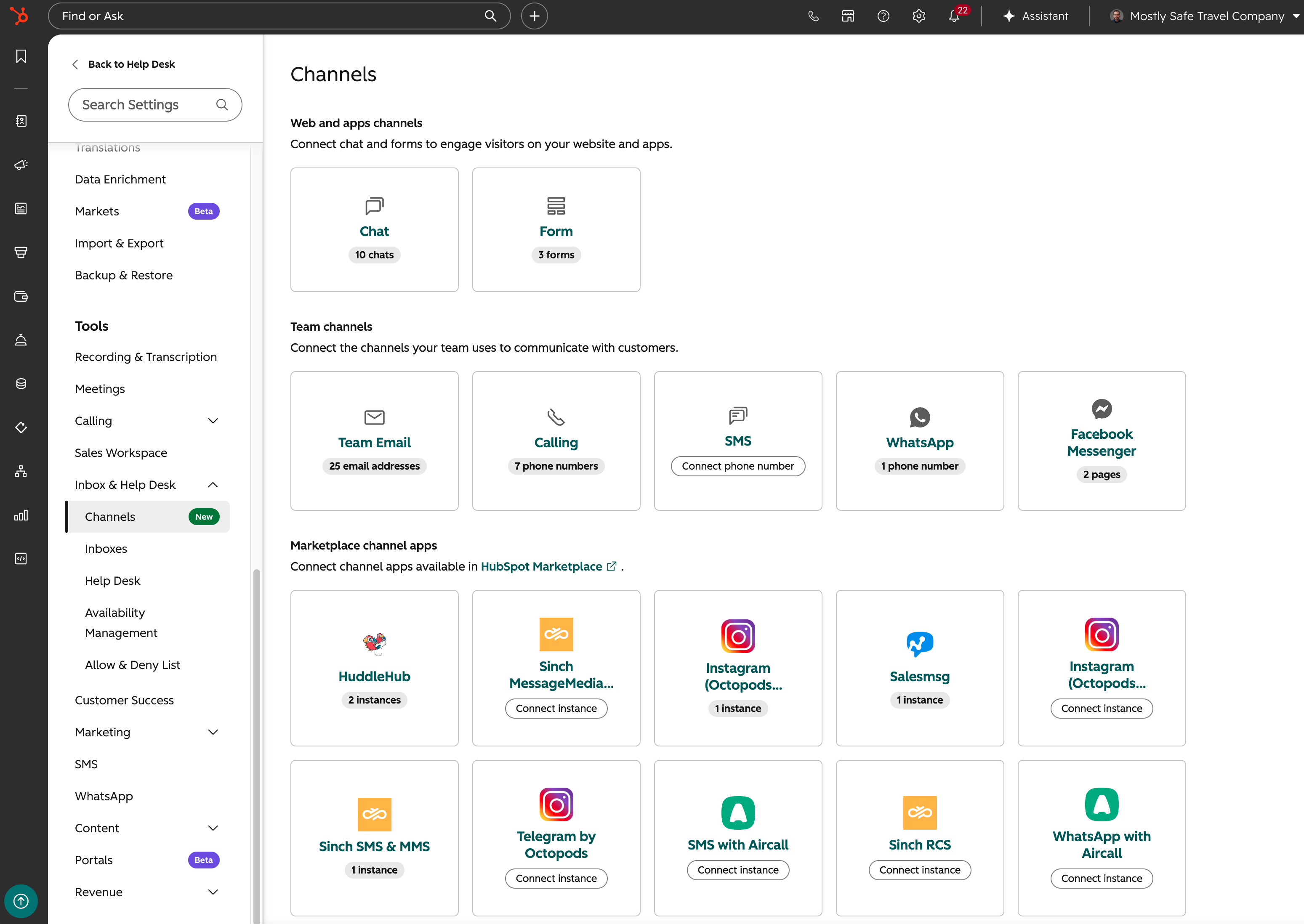
Head to Settings > Channels to see what's connected, or hit "Connect a channel" to add something new with the wizard's help.
LinkedIn Content, Written While You Do Something Else
Coming up with social content that actually sounds like your brand, backed by something real instead of generic filler, takes time most marketing teams just don't have. HubSpot's new Content Agent is built to solve that. You can generate LinkedIn posts and articles from three places you're probably already working in: the Social tool, the AEO tool, and the blog tool. It starts with everything HubSpot already knows about your business, your brand voice, your audiences, your competitors, and does the research before it writes anything. Bring your own topic, repurpose a page or blog post you've already published, or pick from an AI suggestion, then hit Generate and go do something else. The draft lands in the Social tool ready for your review.
For a property management or real estate team, this could actually solve the "we keep meaning to post more" problem. Say a leasing office just published a blog post on winterizing an apartment. That same post can become a LinkedIn article and a companion post without anyone starting from a blank page. Or an agent notices a suggested topic based on recent market activity, like rising demand in a specific neighborhood, and gets a research backed draft sitting in their queue within minutes. For teams without a dedicated content person, that's often the difference between showing up on LinkedIn consistently and letting it quietly fall off the list.
The Takeaway
For property managers and real estate teams, staying on top of HubSpot updates can help you get more value from the tools you’re already using. Taking a few minutes each week to review new features and changes can help you catch potential issues early, find new ways to improve your processes, and make sure your HubSpot account continues to support your team as your business grows.
HubSpot is always evolving, and keeping your portal up to date can be easier with the right support. Geekly Media can review your HubSpot portal and help you get started.


 7 min read

-1.png)